
Secure I/O
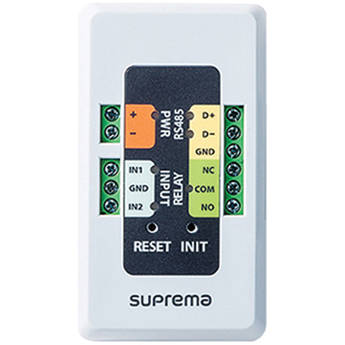
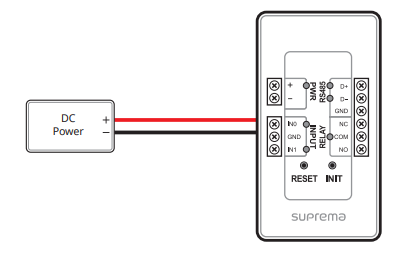
Power
Do not share the power with the access controller.
If the power is shared by other devices, it should provide 9–18V and a minimum of 500 mA.
When using a power adapter, it should have IEC/EN 62368-1 certification
RS-485
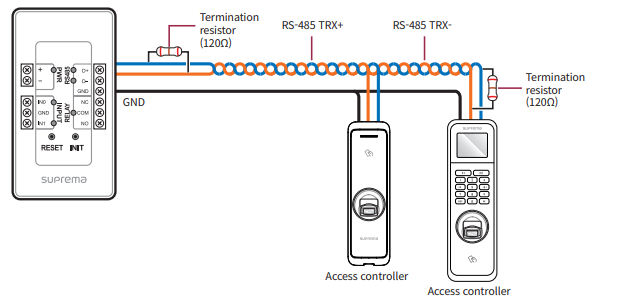
RS-485 should be twisted pair, and maximum length is 1.2 km.
Connect a termination resistor (120Ω) to both ends of a RS-485 daisy chain connection. It should be installed at both ends of the daisy chain. If it is installed in the middle of the chain, the performance in communicating will deteriorate because it reduces the signal level.
Inputs
You can connect a fire sensor, heat sensor, security sensor, door sensor, exit button, or etc. The SUPERVISED INPUT 0 to 11 pins detect the voltage flowing through the circuit to monitor device disconnection, short, on, and off conditions, and can also be used as a general TTL input. With BioStar 2, you can set the behavior according to the Supervised Input status, and you can monitor the status of each input.

Relay
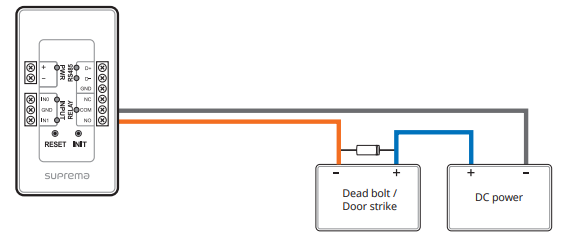
In order to use the Fail Secure Lock, connect N/O relay as shown in the figure below. There is normally no current flowing through the relay for the Fail Secure Lock. When the current flow is activated by the relay, the door will open. If the power supply to the product is cut off due to a power failure or an external factor, the door will lock.
Reset
The Reset button interrupts the power of the device, this stops you having to remove the power cable from the device to reboot it.
Init
The init button is used to reset the connection of the Secure I/O from a previously connected device, it removes the certificates of the previous device back to factory.