Bioentry W2
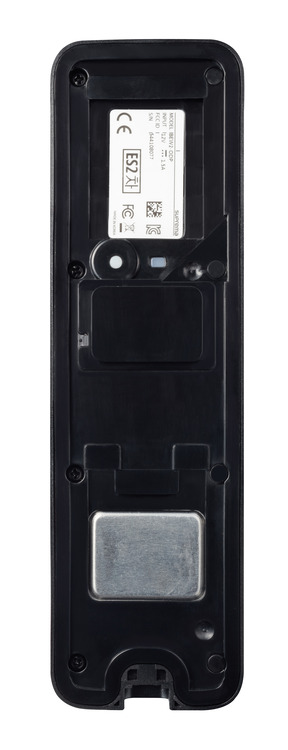
Device info
Here is the information of the main device, you have some useful pieces of information:
- Model - This is the device itself and the version of the device e.g BEW2(device) - ODB(type)
- Input - The power in put required for the device, If the device type has a P ODPB then it can also be powered over POE
- Serial number - This can be used for RMA's and to find the mac address of the Device
Reset Button
This can be used to factory default the device itself, pressing the button and holding down will play a chime after 3 seconds indicating a factory reset of the device.
LED indicator
This is the Network LED status indicator. it will show if the network is connected, DHCP failed or no connection can be made
Green solid: Authentication success
• Red solid: Authentication failure
• Blue/Sky blue blinking: Normal operation
• Blue/Green blinking: The IP address has not been received properly when using
DHCP
• Blue/Green blinking: When initializing network settings
• Green blinking: Waiting for an input
• Green/White blinking: Connecting with the Airfob Pass (BLE) application of Suprema
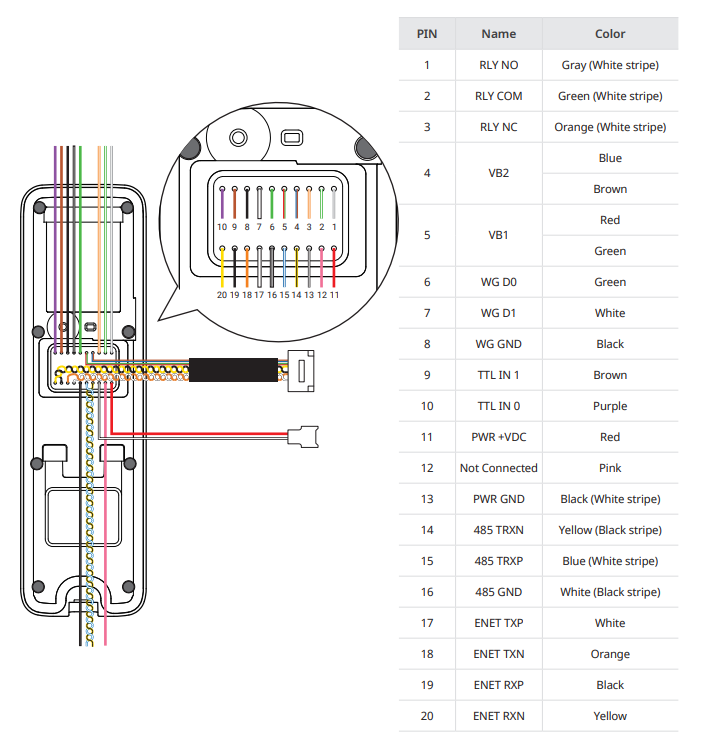
Cables
This is where the cables will be, they come out of the epoxy plastic and are colour coordinated: